2026 Best Robot Pet for Home and Business?
Choosing the 2026 best robot pet requires more than comparing glossy advertisements. A useful robot pet should fit real routines, not merely look impressive in a showroom. At home, it may greet children, respond to voice commands, follow movement, or provide gentle companionship during quiet evenings. In a business, it might welcome visitors, support demonstrations, guide guests, or create memorable customer experiences.
This guide examines performance through practical factors, including battery life, navigation, noise, maintenance, software reliability, and data protection. It also considers accessibility, because a complicated setup can frustrate families and staff. Hands-on testing matters here. A device that performs well for ten minutes may struggle after several hours of repeated interaction. Small details matter. Does it recover after hitting a chair? Can employees clean its sensors easily? Will its personality remain engaging after several weeks?
There is no perfect choice.
Independent reviews, manufacturer specifications, warranty terms, and user feedback should all influence the final decision. We will compare popular models for different environments rather than declare one universal winner. A quiet apartment needs different behavior from a busy hotel lobby or a creative office. Some products offer advanced learning features, but they may require stronger privacy controls and regular updates. Others feel less intelligent, yet remain dependable and easier to operate. That trade-off deserves honest attention. The best robot pet for 2026 may not be the most advanced model; it may be the one that people can trust, maintain, and enjoy every day.
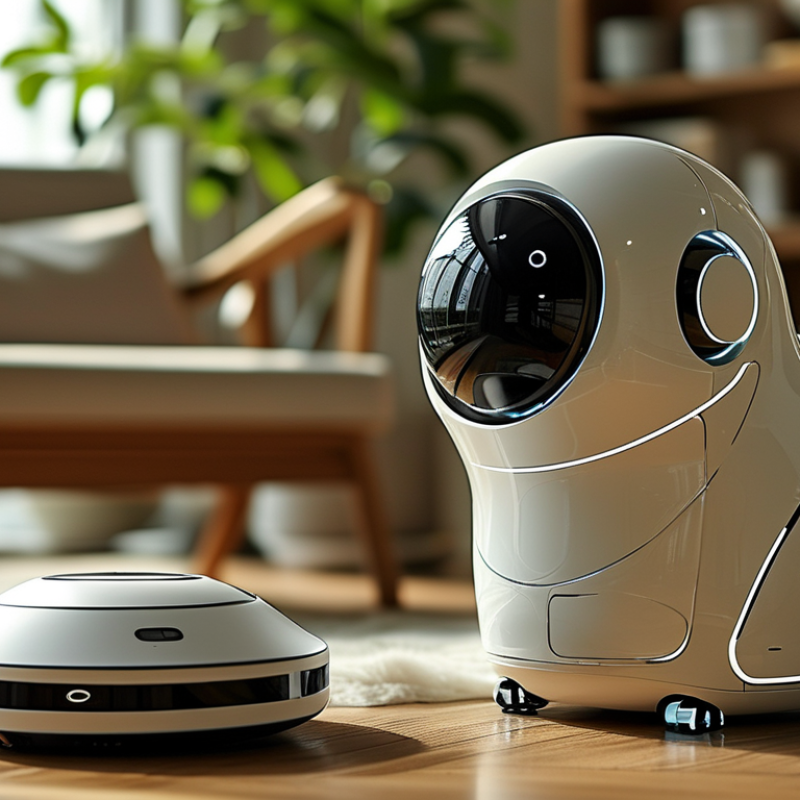
Table of Contents
[Hide]
Robot Pet Basics: Definition, Types, and Core Functions
A robot pet is an interactive machine designed to imitate selected animal behaviors. It may walk, blink, respond to touch, or produce familiar sounds. Unlike a living pet, it needs charging, software updates, and controlled data storage. That difference matters. At home, it can provide playful interaction without feeding or cleaning. In a business, it may welcome visitors, support demonstrations, or create a calmer waiting area. Its value depends on purpose, not novelty alone.
Common types include robotic dogs, cats, birds, and small desktop companions. Mobile models use cameras, microphones, touch sensors, and obstacle detection. Stationary models focus on conversation, facial movement, reminders, or learning activities. Core functions often include autonomous movement, voice response, scheduled routines, and app-based control. Some devices collect environmental data. Users should check storage settings before placing one near private conversations. Small details matter.
A reliable evaluation should measure response time, operating noise, battery duration, repair access, and behavior around children or coworkers. Test it in ordinary conditions, such as a carpeted room or busy reception desk. Marketing claims can sound impressive. Performance can vary. A robot may miss commands, repeat phrases, or stop during an update. It cannot replace emotional care, professional supervision, or a trained service animal. Businesses also need clear policies for recordings and visitor consent.
2026 Best Robot Pet for Home and Business? - Robot Pet Basics: Definition, Types, and Core Functions
A practical comparison of major robot pet categories, capabilities, and suitable environments
| Robot Pet Type | Basic Definition | Typical Interaction | Mobility | Core Functions | Common Sensors | Typical Runtime or Operating Pattern | Best Home Use | Best Business Use | Main Limitations | Overall Suitability |
|---|---|---|---|---|---|---|---|---|---|---|
| Interactive Companion Robot | A stationary or semi-mobile robot designed to provide conversation, expressions, reminders, and social engagement rather than perform heavy physical work. | Voice conversation, touch response, facial animation, gestures, scheduled prompts, and personalized routines. | Usually stationary; some models can rotate, tilt, or move short distances on a tabletop or floor. | Conversation Reminders Emotional feedback Entertainment | Microphones, speakers, touch sensors, cameras, proximity sensors, and motion sensors. | Often designed for daily intermittent use; operating time depends on processor load, display use, movement, and battery capacity. | Companionship, routine support, family interaction, and accessibility assistance. | Reception greetings, visitor engagement, patient or resident activities, and educational demonstrations. | May have limited physical assistance, may require internet connectivity for advanced functions, and can misunderstand speech in noisy areas. | High for social interaction |
| Robotic Dog | A quadruped robot designed to imitate selected dog-like behaviors such as walking, following, responding to commands, and playing. | Voice commands, touch interaction, movement games, object tracking, programmed behaviors, and remote control. | Four-legged movement; some units can climb small thresholds, turn in place, or recover from minor disturbances. | Walking Following Trick routines Patrol support | Cameras, inertial measurement units, joint-position sensors, microphones, distance sensors, and contact sensors. | Active movement is generally limited by battery capacity; charging is required after periods of walking or repeated demonstrations. | Interactive play, technology learning, simulated pet ownership, and movement-based entertainment. | Public demonstrations, STEM education, venue engagement, controlled inspection, and interactive exhibitions. | Higher purchase and maintenance complexity than stationary robots; movement can be noisy, and it is not a replacement for security infrastructure. | High for mobility and engagement |
| Robotic Cat | A compact companion robot that imitates selected cat-like behaviors, including head movement, vocal responses, touch reactions, and resting routines. | Petting, voice interaction, proximity response, sound effects, and repeated behavioral patterns. | Typically stationary or limited to small movements; some designs use moving heads, tails, ears, or wheels. | Touch response Sound interaction Companionship Routine play | Touch sensors, microphones, proximity sensors, light sensors, and motion sensors. | Generally suitable for repeated short sessions and low-energy continuous standby operation. | Quiet companionship, small living spaces, allergy-sensitive households, and assisted-living activities. | Waiting-room engagement, senior-care activities, classroom demonstrations, and stress-reduction programs. | Limited navigation and physical activity; behavior is usually more scripted than that of mobile robots. | High for quiet companionship |
| Robotic Bird | A small interactive robot that reproduces selected bird-like movements, sounds, colors, or flapping actions. | Sound activation, motion response, touch interaction, programmed songs, and visual attention. | Usually stationary, perched, or attached to a base; true autonomous flight is uncommon in indoor consumer applications. | Sound playback Motion display Education Visual engagement | Microphones, light sensors, touch sensors, cameras, and proximity sensors. | Low mechanical movement can support extended standby use, while frequent sound or motion reduces battery duration. | Decorative interaction, nature-themed learning, gentle entertainment, and compact-space companionship. | Exhibitions, museums, educational areas, retail displays, and visitor-attraction installations. | Limited navigation, limited physical interaction, and possible noise concerns in quiet environments. | Moderate for visual engagement |
| Autonomous Mobile Pet Robot | A wheeled or tracked robot that navigates indoor spaces while providing pet-like interaction, monitoring, or scheduled activities. | Following people, responding to calls, autonomous roaming, remote viewing, and interactive games. | Wheeled or tracked; generally effective on level indoor floors and may struggle with stairs, thick rugs, or high thresholds. | Navigation Remote monitoring Follow-me mode Interactive play | Cameras, wheel encoders, inertial sensors, microphones, infrared or depth sensors, and obstacle-detection sensors. | Active roaming and video functions consume more power than standby; automatic docking may support repeated daily operation. | Home monitoring, family interaction, remote check-ins, and activity prompts. | Reception assistance, facility tours, basic patrol observation, customer engagement, and internal communication. | Performance depends on floor layout, lighting, wireless coverage, privacy settings, and obstacle-free pathways. | High for monitoring and mobility |
| Telepresence Pet Robot | A remotely operated mobile robot that enables a person to see, hear, speak, and move around a home or workplace from a distance. | Two-way audio, live video, remote driving, screen-based communication, and scheduled check-ins. | Usually wheeled and designed for indoor surfaces; many units use remote or semi-autonomous navigation assistance. | Video communication Remote presence Remote driving Observation | Wide-angle camera, microphones, speakers, wheel sensors, proximity sensors, and docking-position sensors. | Video calls and continuous movement require frequent charging; standby operation is normally much longer than active telepresence. | Checking on family members, remote communication, and interaction with pets while away. | Remote office presence, distributed-team communication, facility checks, and customer-service support. | Requires reliable network access and responsible camera use; it may not navigate stairs or crowded spaces reliably. | High for remote communication |
| Educational Robot Pet | A programmable robot shaped or themed like a pet and intended to teach coding, robotics, logic, or responsible technology use. | Block-based or text programming, sensor experiments, voice commands, challenges, and guided lessons. | Varies from stationary kits to wheeled, tracked, or legged platforms. | Coding education Sensor learning Problem solving Project work | Light, sound, distance, line-following, touch, motion, temperature, and motor-position sensors. | Classroom operation is normally organized into lessons or projects, with charging or battery replacement between sessions as needed. | Family learning, beginner programming, science projects, and supervised creative play. | Schools, training centers, libraries, workshops, and corporate education programs. | Requires adult or instructor guidance for younger users; educational value depends on curriculum and software support. | High for learning and training |
| Therapeutic or Care-Support Robot | A robot designed to support comfort, engagement, reminders, or structured activities for older adults, children, or people requiring additional assistance. | Calming responses, guided activities, reminders, simple conversation, music, and caregiver-configured routines. | Often stationary or slowly mobile to reduce safety risks and simplify operation. | Reminders Activity guidance Social support Caregiver alerts | Microphones, cameras where appropriate, touch sensors, motion sensors, location sensors, and environmental sensors. | Designed for scheduled or supervised use; charging requirements vary according to display, audio, connectivity, and movement. | Companionship, routine prompts, cognitive activities, and support between caregiver visits. | Senior-care facilities, rehabilitation environments, patient engagement, and structured wellness activities. | Should complement rather than replace professional care; privacy, consent, accessibility, and human supervision are essential. | High for structured support |
| Pet-Like Security and Monitoring Robot | An autonomous or remotely supervised robot that combines pet-like interaction with indoor observation and basic alert functions. | Scheduled patrols, remote viewing, motion alerts, two-way audio, and interaction with authorized users. | Usually wheeled; navigation is optimized for mapped indoor routes and accessible floor surfaces. | Patrol Video monitoring Alerts Remote access | Cameras, microphones, motion sensors, depth or infrared sensors, wheel encoders, and environmental sensors. | Patrol frequency, video streaming, lighting, and wireless communication determine charging intervals. | Pet-room monitoring, basic home awareness, package-area observation, and remote check-ins. | After-hours observation, inventory-area checks, visitor alerts, and low-risk indoor monitoring. | It cannot replace alarms, access-control systems, trained security staff, or emergency response services. | High for observation; limited for security |
Selection principle: choose based on the primary objective—companionship, mobility, education, remote communication, care support, or monitoring. Actual performance depends on the robot's software, sensor configuration, floor conditions, network access, privacy controls, and maintenance requirements.
Related Posts
-

How to Choose the Best Picking Robots for Your Warehouse?
-

Top 10 Benefits of Palletizing Robots for Your Business?
-
How to Choose the Best Robotic Arm for Your Needs?
-
2026 Best Home Robot Innovations You Need to Know?
-
What Are the Advantages of Using Robotic Process Automation Tools
-
Top 10 Picking Robots Revolutionizing Warehouse Efficiency in 2023
Customers




Smart Robotics brand movie
Watch video