Why Do You Need an Underwater Camera Light?
Why Do You Need an Underwater Camera Light?
Underwater scenes lose color quickly as depth increases. Reds disappear first, leaving photographs blue, green, and flat. An Underwater Camera Light restores warmer tones and reveals details that natural sunlight cannot reach. It can illuminate a coral texture, a small fish hiding beneath a ledge, or particles drifting through a dark wreck interior.
Experienced underwater photographers also use lights to improve contrast and focus. A steady beam helps the camera detect subjects in dim conditions. It can make manual focusing easier during night dives. However, brightness alone does not guarantee better images. A powerful light placed too close may expose floating particles and create distracting backscatter. Position matters.
A reliable setup should match your camera, housing, diving depth, and shooting style. Check the light’s color temperature, beam angle, battery life, controls, and waterproof rating. Dual lights often produce more balanced illumination, while a compact single light may suit travel or macro work. Test the equipment in shallow water before a serious dive. Small leaks become expensive lessons.
The advice is not absolute. Clear tropical water, cloudy conditions, and deep environments all require different lighting choices. Your subject also matters. A slow-moving nudibranch needs different handling than a fast reef fish. With practice, an Underwater Camera Light becomes more than an accessory. It becomes a practical tool for accurate color, controlled shadows, and clearer visual storytelling beneath the surface.
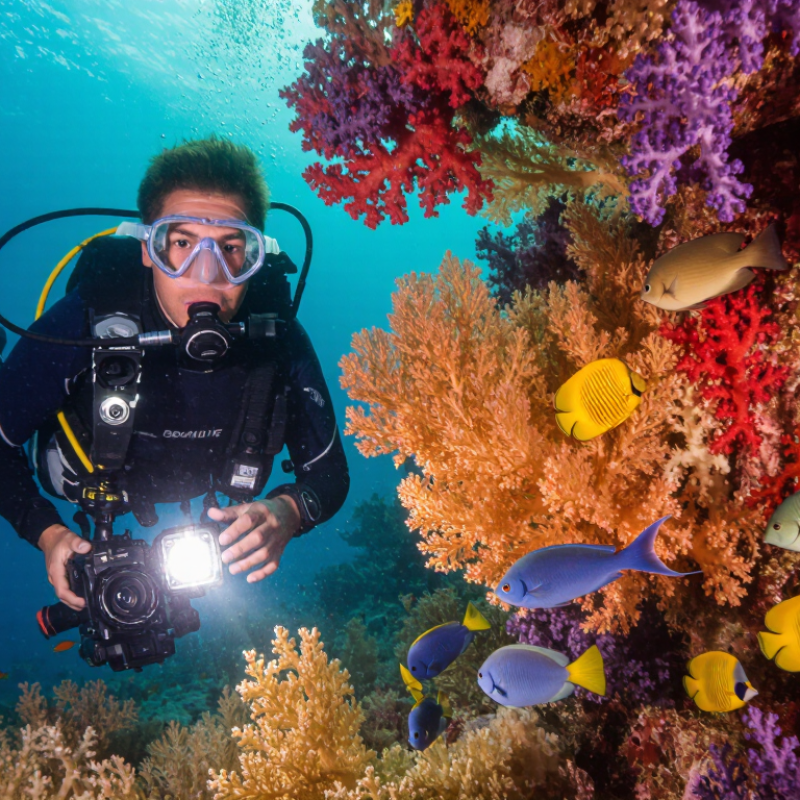
Table of Contents [Hide]
What an Underwater Camera Light Does
An underwater camera light restores color that water removes. NOAA Ocean Service explains that water absorbs red wavelengths quickly, often within the first few metres. Orange and yellow fade soon after. Blue remains, but it can make coral, skin, and equipment look cold and flat. A light adds balanced illumination near the subject. It reveals natural reds, fine textures, and small movements from shrimp or sea slugs. The effect is practical, not decorative. Without light, a camera may record a dim green-blue scene, even when your eyes see more detail.
A camera light also improves contrast and focusing. It helps the autofocus system identify edges on a dark wreck or a moving fish. However, stronger output does not always create better images. Poor positioning can light suspended particles and produce heavy backscatter. The Professional Association of Diving Instructors notes that visibility changes with depth, current, and local conditions, so settings must remain flexible. In my experience, I sometimes increase brightness too quickly. That mistake makes pale subjects look harsh. A wider, softer beam often works better at close range.
Tips: Keep the light beside the camera, not directly above the lens. Start with low power. Move closer instead of zooming through water. Check the screen after each shot. If particles look like snow, change the angle first. A light cannot fix every exposure problem, and that limitation is worth remembering.
| Function | What It Does | Why It Matters Underwater | Best Use | Practical Consideration |
|---|---|---|---|---|
| Restores Color | Provides artificial light to replace wavelengths that are absorbed as depth increases. | Red, orange, and yellow tones can appear muted or disappear in natural underwater light. | Color photography | Use the light close to the subject and avoid aiming it directly through suspended particles. |
| Reveals Detail | Illuminates textures, patterns, and small features that may be difficult to see in dim water. | Low-light conditions can reduce contrast and make fine details look flat or indistinct. | Macro subjects | A controlled beam helps highlight the subject without unnecessarily lighting the background. |
| Improves Exposure | Adds front light so the camera can record a brighter subject at suitable exposure settings. | Water absorbs and scatters light, especially in deeper, shaded, or low-visibility environments. | Still images | Light output, distance, aperture, shutter speed, and ISO all affect the final exposure. |
| Supports Video | Provides continuous illumination while the camera records moving scenes. | Video cannot rely on a flash for every frame, so continuous light is useful for nearby subjects. | Close-range video | Battery capacity and heat management become more important during longer recordings. |
| Helps Focusing | Brightens the subject area so the camera's focusing system can detect edges and contrast more easily. | Dark water and low-contrast subjects can make autofocus less reliable. | Low-light shooting | A focus-assist mode may be useful when continuous illumination is not required in the final image. |
| Controls Beam Coverage | Directs light over a specific area using the light's beam angle and positioning. | Wide scenes and small subjects require different coverage to illuminate the subject evenly. | Wide and macro work | Two lights can provide more even coverage and reduce harsh shadows in many shooting setups. |
| Reduces Backscatter Risk | Allows the light to be positioned away from the camera's lens axis. | Particles between the camera and subject can reflect light back into the lens as bright spots. | Silty water | Angling the lights outward and keeping them off-axis generally helps limit illuminated particles. |
| Adds Creative Light | Creates directional highlights, shadows, and separation between the subject and its surroundings. | Artificial light gives the photographer more control than ambient light alone. | Creative composition | Adjust the light angle gradually to preserve natural-looking texture and avoid overexposure. |
| Works in Dark Environments | Provides usable illumination in caves, wreck interiors, night dives, and shaded areas. | Ambient light may be insufficient or uneven in enclosed and nighttime underwater locations. | Night and cave scenes | Use equipment with a depth rating appropriate for the planned dive and inspect seals before entry. |
Customers




Smart Robotics brand movie
Watch video