What Is an Integrated Smart Home System?

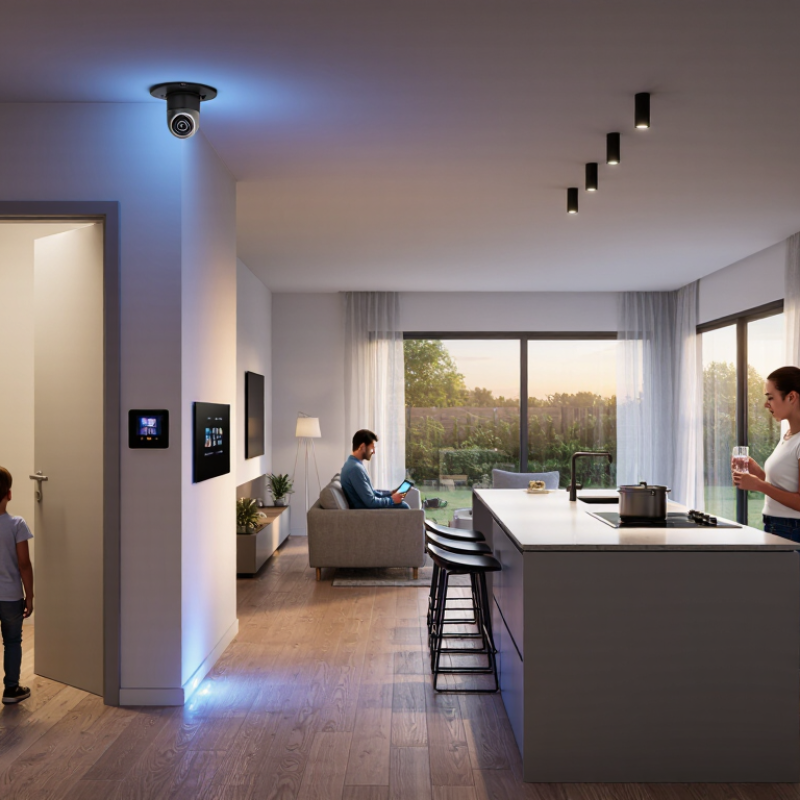
An Integrated Smart Home connects lighting, climate control, security, entertainment, and appliances through one coordinated system. Instead of managing six separate applications, a homeowner can create a simple scene: the front door locks, hallway lights dim, the thermostat adjusts, and outdoor cameras begin monitoring. The experience feels quiet. That is the point.

Smart-home strategist Michael Wolf has described the smart home as “a platform, not a collection of gadgets.” This idea explains why integration matters. A professionally designed system considers wiring, network strength, device compatibility, privacy settings, and future upgrades. It should also respond reliably when the internet connection fails. A touchscreen on the kitchen wall means little if the lights respond slowly.

The best Integrated Smart Home systems begin with daily routines, not product lists. An installer may observe how a family enters the house, sleeps, works, and manages energy. Those details shape useful automation. Motion sensors can illuminate a dark stairway. Door contacts can notify a parent when a child arrives. Temperature zones can reduce wasted heating in unused rooms.

Still, smart homes are not perfect. Voice recognition can misunderstand accents. Sensors can miss movement. Complex systems may confuse residents without clear controls. That weakness deserves attention. Good design includes manual switches, transparent permissions, secure updates, and practical training. Integration should reduce friction, not create another technical burden. A truly intelligent home feels dependable, understandable, and slightly invisible.
What Is an Integrated Smart Home System?

Definition and Core Idea of an Integrated Smart Home System

An integrated smart home system connects lighting, heating, security, appliances, and sensors through one coordinated digital environment. Its core idea is cooperation, not simply adding more connected devices. A shared platform interprets information from different devices and triggers useful actions. For example, a window sensor can pause heating when fresh air enters.

The system may use a central hub, cloud services, local networks, or a combination of these technologies. It should offer one control method, consistent automation rules, and clear permission settings. According to IDC’s Worldwide Smart Home Device Tracker, global smart home device shipments were expected to reach about 892 million units in 2024. Growth suggests strong demand, but device ownership alone does not create integration. Poor compatibility can still leave residents managing several separate applications.

Energy management gives this concept practical value. The International Energy Agency reports that buildings consume around 30% of global final energy. An integrated system can respond to occupancy, daylight, temperature, and electricity prices. A hallway light might dim automatically after midnight. Small actions matter. Yet automation is not always intelligent. A sensor may misread an empty room, or a heating schedule may ignore a resident’s changing routine. Reliable systems need manual controls, software updates, data protection, and transparent failure alerts. My experience with connected environments suggests that simplicity is harder than adding features. Users should understand what the system does, what it records, and how to override it.

Key Components and Connected Technologies

What Is an Integrated Smart Home System?

Key Components and Connected Technologies

An integrated smart home system connects lighting, heating, security, appliances, and entertainment through one coordinated network.

In my experience, the best systems reduce small daily tasks without making the home feel complicated.

A central controller, mobile application, or voice interface manages connected devices and user preferences. However, convenience depends on reliable communication between every component.

Sensors provide the system with useful information. Motion sensors detect activity, door sensors identify entry, and temperature sensors monitor room conditions. Cameras may support visual awareness, while water-leak detectors can warn residents before damage spreads.

These devices usually communicate through wireless protocols or wired connections. A local hub can process some commands inside the home, which may improve response speed and privacy.

Automation rules create the practical value. Lights can turn on when movement is detected, and heating can adjust when a room becomes empty. Energy monitors can reveal unusual consumption patterns.

Yet automation is not always elegant. A sensor may misread a pet, sunlight may affect detection, and a weak network can interrupt routines.

Careful installation, software updates, strong passwords, and limited data sharing remain essential. Compatibility also deserves attention, because devices from different systems may not exchange information smoothly.

A simple setup often works better than an impressive but fragile one.

How Devices Communicate and Work Together

What Is an Integrated Smart Home System?

An integrated smart home system lets devices exchange information and coordinate actions. A motion sensor may detect movement, then signal lights, cameras, or thermostats. This communication usually travels through Wi-Fi, Thread, Bluetooth, Ethernet, or another compatible protocol. A central controller can translate commands between devices. Cloud services may add remote access, voice control, and software updates.

The process is easier to understand through a simple evening routine. A door sensor reports “open.” The controller checks the time and household settings. It can then turn on hallway lighting and adjust the thermostat. Local processing can reduce delay and protect basic functions during an internet outage. According to IoT Analytics’ State of IoT—Spring 2024 report, connected IoT devices reached 16.6 billion worldwide in 2023. More devices create more opportunities, but also more compatibility problems.

Interoperability matters more than device quantity. The Matter standard aims to create a shared communication layer across major smart home categories. The Connectivity Standards Alliance has continued expanding its specifications, including improvements for energy management and larger device ecosystems. Still, real installations are not perfectly seamless. Older equipment may need a bridge, and wireless signals can weaken behind concrete walls. A reliable setup uses clear naming, secure passwords, updated firmware, and carefully tested automations. Keep routines simple. Overcomplicated rules often fail quietly. Frequently review permissions and device logs. A smart home should coordinate predictably, not merely appear intelligent.

Benefits, Applications, and User Experiences

What Is an Integrated Smart Home System?

Benefits, Applications, and User Experiences

An integrated smart home system connects lighting, heating, ventilation, security, and appliances through one coordinated platform. Instead of opening five applications, residents can adjust several devices with one command. The experience feels most useful during ordinary moments: lights dim when a film starts, heating lowers when nobody is home, and a door sensor sends an immediate alert. The International Energy Agency reports that buildings consume about 30% of global final energy. Smart automation can reduce waste, although savings depend on equipment quality and user settings.

Real-world benefits include convenience, accessibility, and potentially lower energy bills. Older adults may control rooms without walking between switches. Families can check temperature, leaks, or entry points remotely. Parks Associates reported in 2024 that smart-home device ownership continues to expand among internet households, yet many users still manage devices separately. That gap matters. An integrated system should simplify life, not create another technical task. My own experience is less perfect: voice commands sometimes fail, and an overactive alert can become irritating. Human review remains necessary.

Tips:

Start with one clear problem, such as hallway lighting or heating schedules. Choose systems using open communication standards and strong authentication. Test automation for a week before adding more rules. Keep manual controls available. Review permissions monthly, especially after guests or household changes. Track energy use before and after installation, because impressive dashboards do not always prove real savings.

Security, Privacy, Installation, and Maintenance Considerations

What Is an Integrated Smart Home System?

An integrated smart home system connects lights, locks, cameras, sensors, heating, and alarms through one coordinated network. Its value is not merely remote control. Devices can respond together when unusual activity occurs. Security starts with strong passwords, encrypted connections, and separate guest access. Change default settings before connecting new equipment. A system can still fail if the home router is poorly protected.

Privacy requires deliberate choices. Review which devices collect audio, video, location, or usage data. Place indoor cameras carefully, especially near bedrooms and private spaces. Select storage settings that match your household’s comfort level. Cloud access is convenient, but it deserves regular review. I have found that people often accept broad permissions without reading them. That habit needs reconsideration.

Tips: Use unique passwords and multi-factor authentication. Update device software promptly. Disable unused microphones and remote access features. Ask installers to explain every permission and network connection. During installation, label cables, document device locations, and test each emergency alert. Avoid placing critical sensors where furniture can block them. Maintenance should include monthly battery checks, quarterly alert tests, and periodic access reviews. Keep a simple recovery plan if the internet fails. No setup is perfect. A missed battery warning or forgotten access account can weaken an otherwise careful system.

What Is an Integrated Smart Home System? - Security, Privacy, Installation, and Maintenance Considerations

Dimension Data Point Typical or Recommended Practice Why It Matters Verification Method
System Architecture Central control layer Use one application or automation platform to coordinate lighting, climate control, access devices, sensors, and household routines. Reduces fragmented controls and allows devices from different categories to work together. Confirm that each device can be discovered, controlled, and automated from the selected platform.
Interoperability Common communication standards Prioritize products supporting established standards such as Wi-Fi, Ethernet, Thread, Zigbee, or Matter, subject to compatibility requirements. Open or widely supported standards can reduce dependence on a single ecosystem. Check the device specification, supported frequency, network requirements, and controller compatibility.
Security Account protection Enable multi-factor authentication where available, use unique passwords, and remove inactive user accounts. Compromised accounts can expose cameras, locks, alarms, and automation controls. Review account settings, active sessions, recovery methods, and user permissions.
Security Network separation Place smart devices on a separate guest or IoT network when supported, while preserving required access to the controller. Limits the potential impact of a compromised low-trust device. Inspect router network segments, firewall rules, and device-to-device permissions.
Security Software and firmware updates Enable automatic updates when appropriate and check unsupported or end-of-life devices regularly. Updates may correct security vulnerabilities, compatibility problems, and reliability defects. Record current firmware versions and review published support or end-of-support information.
Privacy Data collection Identify whether devices collect audio, video, location, occupancy, biometric, energy, or usage data. Different data types create different privacy and regulatory risks. Read the privacy notice, permissions list, retention policy, and data-sharing disclosures.
Privacy Local versus cloud processing Prefer local processing for functions that do not require remote access, while evaluating cloud dependencies for notifications and backups. Local processing can reduce external data transfers and improve operation during internet outages. Test essential automations with the internet disconnected and inspect documented processing locations.
Privacy Camera and microphone controls Use physical shutters, hardware mute controls, privacy zones, and role-based viewing permissions where available. Reduces unnecessary monitoring inside private areas. Perform a room-by-room privacy review and test recording, streaming, and microphone states.
Installation Power and connectivity planning Confirm outlet locations, electrical capacity, wireless coverage, wired network paths, and backup power needs before installation. Poor placement or unstable power can cause delays, dropouts, and false alerts. Create a floor plan showing devices, cable routes, network equipment, and power sources.
Installation Safety-critical equipment Use qualified professionals for mains electrical work, structural alterations, gas-related systems, and code-regulated installations. Incorrect installation can create fire, electric shock, gas, or building-code hazards. Obtain required permits or inspections and retain installation records.
Installation Fail-safe behavior Define what happens during power loss, internet failure, controller failure, or sensor malfunction. Critical functions should not depend on a single network connection or cloud service. Run outage simulations and confirm manual overrides for locks, lighting, heating, and alarms.
Maintenance Routine testing Test alarms, sensors, access devices, automations, and notifications at intervals appropriate to their safety importance. A connected device is not reliable if its battery, sensor, network, or automation rule has failed. Maintain a test log with dates, results, faults, and corrective actions.
Maintenance Battery management Monitor battery status and replace batteries according to device alerts, manufacturer guidance, and measured performance. Low batteries can disable sensors, locks, leak detectors, and emergency notifications. Review battery reports and confirm low-battery alerts reach the intended users.
Maintenance Configuration backup Keep an up-to-date inventory of devices, network settings, automation rules, access permissions, and recovery information. A documented configuration shortens recovery time after hardware failure or account loss. Store encrypted backups in a controlled location and verify that restoration procedures work.
Reliability Manual override and accessibility Provide physical controls and accessible alternatives for essential functions such as entry, lighting, heating, and emergency alerts. Users need safe operation when an app, voice assistant, network, or automation rule is unavailable. Test controls without a phone or internet connection and verify usability for all household members.

Smart Robotics brand movie

Watch video