What Is a Robot Battery and How Does It Work?
A Robot Battery is more than a replaceable power pack. It is the energy system that determines a robot’s operating time, movement, payload, safety, and charging schedule. Inside the enclosure, battery cells store chemical energy and release it as controlled electrical power. A battery management system monitors voltage, temperature, current, and remaining capacity. The robot’s controller then converts this information into practical decisions, such as slowing a motor or returning to a charging station.
The need is expanding quickly. The International Federation of Robotics reported about 4.28 million industrial robots operating worldwide in 2023, with approximately 541,000 new installations that year. These machines may work beside welding arcs, dust, vibration, and changing temperatures. A warehouse robot faces different demands. It may repeat short trips thousands of times daily. The battery must tolerate that rhythm.
Battery scientist Dr. Shirley Meng has said, “The battery is the heart of the electric vehicle.” The same principle applies to robots, although the engineering targets differ. IDTechEx reports that mobile robots increasingly use lithium-ion batteries because they offer useful energy density, rechargeability, and falling system costs. Yet published figures are not perfectly comparable. Chemistry, robot weight, duty cycle, and charging habits change real-world results. A lithium iron phosphate pack may prioritize safety and cycle life, while a nickel-rich pack may provide higher energy density. Neither option wins everywhere. Understanding how a Robot Battery works requires examining cells, battery management, thermal control, charging, and the robot’s actual workload. Small design choices can decide whether a machine finishes its shift or stops beside a loading bay.
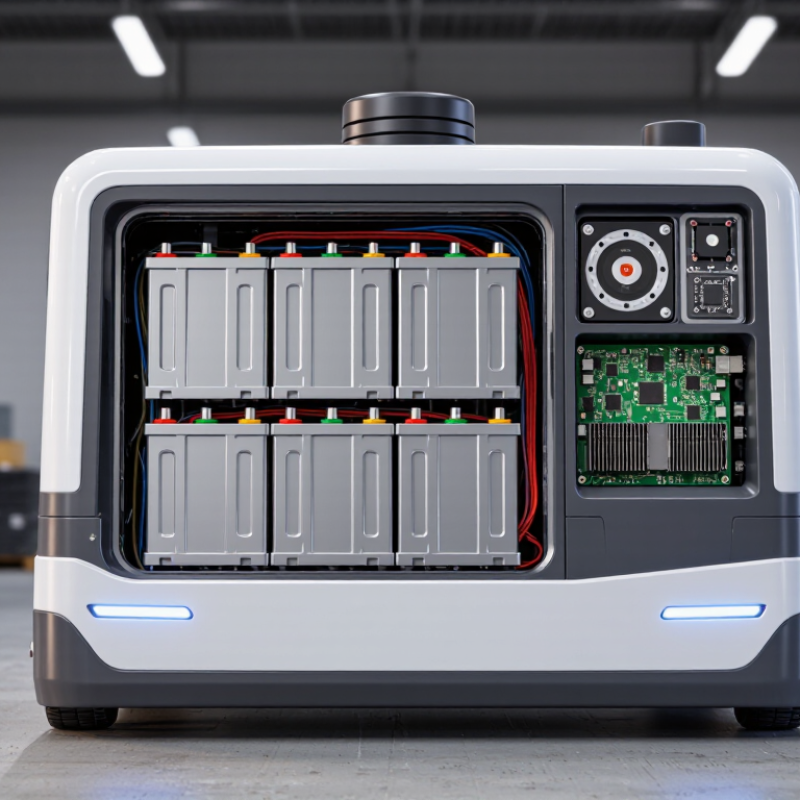
What Is a Robot Battery?
A robot battery is the rechargeable energy source that powers movement, sensors, processors, and communication systems. It is more than a box of power. A typical battery pack contains multiple electrochemical cells, protective circuits, temperature sensors, and connectors. The cells store energy chemically and release it as electrical current. Voltage describes electrical pressure, while capacity indicates how long the battery may operate under specific conditions.
When a robot starts moving, chemical reactions inside the cells push electrons through the circuit. Those electrons reach motors and electronic controls, creating useful motion and decision-making. During charging, the process reverses under controlled electrical input. A battery management system checks voltage, current, and temperature continuously. It can reduce charging speed or disconnect the pack when conditions become unsafe. In practical testing, technicians measure voltage while the robot lifts, turns, or climbs. A simple runtime calculation can mislead. Heavy loads, rough floors, and cold rooms change the result.
Battery selection depends on weight, operating time, charging speed, and movement demands. A small inspection robot may need a light pack, while a mobile industrial unit may require greater capacity. Technicians should inspect swelling, damaged insulation, loose connectors, and unusual heat. Keep terminals clean and follow the specified charging procedure. Battery performance gradually declines with age, even when the robot appears normal. The estimate is never perfect. Small errors matter.
How Robot Batteries Store and Deliver Energy
A robot battery is more than a container of stored electricity. Inside its cells, chemical reactions hold energy until the robot needs movement, sensing, or computing power. During discharge, electrons travel through the external circuit, while ions move inside the cells. This controlled flow creates the voltage that drives motors and electronic components. The battery pack combines several cells to reach the required voltage and capacity. Small packs may power a mobile platform for hours; heavy loads can reduce that time sharply. Reality is less tidy.
A battery management system monitors cell voltage, temperature, current, and state of charge. It balances cells and can disconnect the pack when conditions become unsafe. When a motor starts, it may demand a brief surge of current. The battery responds by delivering that surge, but internal resistance can cause voltage to dip. Worn cells, cold temperatures, loose connections, and steep ramps make this dip more noticeable. Engineers therefore match the pack to the robot’s peak load, not only its average consumption. That distinction matters.
Charging reverses the electrochemical process and returns energy to the cells. A suitable charger controls current and voltage through several charging stages. Sensors help limit overheating and excessive charging. In field testing, operators should record runtime, surface temperature, charging time, and unexpected shutdowns. These details reveal how the battery behaves under real work, not just laboratory conditions. Capacity ratings can be imperfect because load, age, and temperature change usable energy. A robot may report 30 percent remaining, yet struggle on a hill. Battery data needs context.
Key Components Inside a Robot Battery
A robot battery is more than a box filled with rechargeable cells. It is an integrated power system that stores energy and releases it under changing loads. Inside, individual cells create the battery pack’s voltage and capacity. Their chemistry affects weight, charging speed, temperature behavior, and service life. Cells are connected in series to raise voltage, while parallel groups increase available capacity.
The battery management system monitors each cell group during operation. It measures voltage, current, and temperature through small sensors and control circuits. When a cell becomes too hot or too weak, the system can limit power or disconnect the pack. That protection is essential during sudden movements, repeated lifting, or steep climbs. A fuse provides another safety layer if excessive current occurs. The casing protects the internal parts from vibration, dust, and accidental impact. Connectors and cables carry energy to the robot’s motors, controller, and charging port. Small parts matter.
Thermal pads or cooling channels may move heat away from crowded cells. In practice, cooling design is often a compromise. More protection can increase weight and reduce usable space. I have also seen battery readings drift when sensors age or connectors loosen. Regular inspection helps reveal swelling, damaged insulation, unusual heat, or reduced operating time. A reliable battery therefore depends on both sound components and careful maintenance. It is not perfectly predictable. Real robots work in changing conditions.
How a Robot Battery Powers Different Systems
A robot battery is the onboard energy source that keeps a machine moving, sensing, and thinking. It stores electrical energy in cells and releases it as direct current. A battery management system monitors voltage, temperature, and charging conditions. This protection matters because cells can age unevenly during daily operation. In field testing, a robot may show a full charge yet lose power quickly under heavy loads.
The battery usually feeds several systems through a power distribution circuit. Motors draw the most energy when a robot starts, climbs, or carries weight. Sensors need a steadier supply for cameras, distance scanners, and position devices. The computer and communication modules also require clean voltage. If motor demand causes a voltage drop, sensors may report unstable readings. The robot can hesitate or stop.
Heat is another practical concern. Charging and repeated movement create warmth inside the battery housing. Good ventilation, temperature monitoring, and controlled charging reduce stress on the cells. However, real conditions are rarely perfect. Cold floors can reduce available capacity, while dust and frequent braking can increase energy use. Runtime estimates are useful, but they are not promises. Engineers often test batteries with actual routes, payloads, slopes, and pauses. A quieter motor does not always mean a more efficient robot, either. Calibration, wiring losses, and software decisions can change the result.
How a Robot Battery Powers Different Systems
A representative mobile robot using a 24 V, 40 Ah battery has approximately 960 Wh of nominal stored energy. The chart shows typical continuous power demand across major robot systems.
Drive motors usually consume the most power because they move the robot and overcome friction, slopes, and payload weight. Computing, sensors, actuators, communication, and safety electronics draw smaller but essential amounts of energy. Actual consumption varies with speed, terrain, payload, operating temperature, and workload.
Factors That Affect Robot Battery Performance
What Is a Robot Battery and How Does It Work?
Factors That Affect Robot Battery Performance
A robot battery stores chemical energy and releases it as electrical power. The battery supplies motors, sensors, controllers, and communication systems. A battery management system monitors voltage, temperature, and charging conditions. It can reduce power when unsafe limits are reached.
Battery performance depends on more than capacity. A heavy payload makes motors draw more current. Slopes, rough floors, and frequent stops increase energy use. Even sensor cleaning routines can shorten operating time. Temperature also matters. Cold conditions slow chemical reactions, while excessive heat accelerates battery aging. The same battery may perform differently in a warehouse and outdoors.
Charging habits have a strong effect. Repeated deep discharges can reduce usable capacity. Constantly charging at maximum voltage may also increase wear. Age, storage conditions, and connector resistance matter. A practical test should measure runtime under the robot’s actual workload. A capacity label is not a promise. It only describes controlled conditions.
It is easy to overestimate battery life.
Technicians should record load, temperature, charging time, and duty cycle. These details reveal problems that a simple percentage display can hide. A battery may show 40 percent power but deliver much less under acceleration. Regular inspections help identify swelling, unusual heat, damaged cables, or sudden voltage drops. Not every performance issue comes from the battery. Firmware settings, worn motors, and blocked wheels can create similar symptoms. Careful diagnosis remains essential.