2026 Top Amorphous Transformer Body Assembly Worktable Guide

An amorphous transformer body assembly line depends on more than core materials and operator skill. The worktable affects how teams position, secure, inspect, and move each body during assembly. Small details matter: a level, rigid surface; reachable tool holders; adjustable stops; and clear access for lifting equipment. A misplaced clamp can slow work or damage a finished surface. It happens.

This guide examines the Amorphous Transformer Body Assembly Worktable through practical selection and setup considerations. It covers load capacity, tabletop dimensions, fixture compatibility, working height, and access for inspection and handling. It also considers how surface protection, cable routing, and storage affect daily use. These details may seem minor until a tool is out of reach or a fixture obstructs the next operation.

There is no universal layout. That is easy to forget. The right configuration depends on the transformer body’s size and weight, the assembly sequence, available floor space, and the equipment used at the site. Buyers should compare supplier specifications with actual production requirements, then confirm dimensions, rated loads, and adjustment ranges before purchase. Operators can also review a proposed setup using representative components and tools. A careful check may reveal awkward reaches or poor clearance that a brochure does not show. No single table solves every workflow problem, but a well-matched one can support steadier assembly and more consistent inspection.
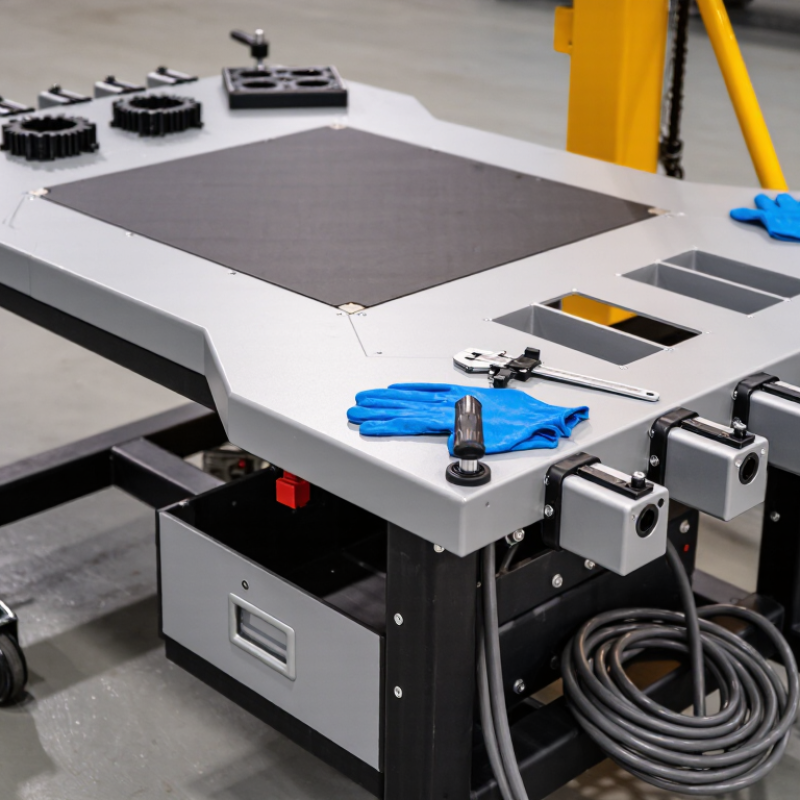
2026 Top Amorphous Transformer Body Assembly Worktable Guide

What an Amorphous Transformer Body Assembly Worktable Is

An amorphous transformer body assembly worktable is a stable platform for positioning and joining the transformer’s main components. Depending on the production process, it may support the core, windings, insulation, and other parts during assembly. Its fixtures help keep components aligned while workers inspect clearances and make connections. It is not the transformer itself, nor a complete production line. Think of it as a controlled workspace built around a specific assembly sequence.

A useful table has a rigid, level surface and enough room for the workpiece, tools, and careful hand movements. Adjustable stops or clamps can reduce shifting, but they should not press fragile core material unnecessarily. Smooth edges, clear access to the work area, and practical tool storage also matter. In real workshops, small layout problems can slow a job: a cable crossing the work surface or a clamp placed just out of reach. A good design is measured against the actual assembly, not appearance alone.

Tips: Check table level and fixture positions before each build. Keep fasteners and insulation materials in labeled trays. Confirm that clamps hold securely without distorting components. Record recurring fit issues; the table may need adjustment. One detail is easy to miss: operators should review whether the setup remains comfortable during longer tasks.

Core Components and Their Functions

A rigid, level frame supports the transformer body during assembly and helps prevent rocking as components are fitted. Leveling feet make it easier to compensate for uneven floors. Check the worktable’s load rating against the body, fixtures, and tools combined. Amorphous ribbon cores can be sensitive to impact and uneven pressure. Keep contact gentle.

Adjustable support rails hold the body at a workable height and spread its weight across stable points. Positioning stops help keep the core and coil assembly aligned during fitting. Padded clamps limit movement without pressing hard on delicate edges. A nearby tool tray keeps fasteners within reach, while clear space around the table helps with inspection. Alignment matters. Recheck the setup after adjustments; a fixture that looks square may still shift under load.

Tips: Before each assembly, check for loose clamps, worn pads, and rocking feet. Test the fixture with light pressure first. Small details count, and no single table setup suits every transformer body.

How the Worktable Supports Transformer Assembly

2026 Top Amorphous Transformer Body Assembly Worktable Guide

How the Worktable Supports Transformer Assembly

An amorphous transformer body assembly worktable supports careful, repeatable work around the core, coils, and insulation. A broad, level surface helps keep components steady while technicians align them. The thin core material can be sensitive to rough handling, so a padded, clean work area is useful. Keep tools within reach, but leave clear space for turning or positioning the assembly. Small details matter.

A well-arranged table can also reduce unnecessary lifting and reaching. Place heavier components near the center, and use bins to separate fasteners, insulation pieces, and hand tools. A simple fixture may help hold a body in place, provided it does not squeeze or distort the assembly. The best setup depends on the process and the operator; one layout may feel awkward after a full shift. That deserves a second look.

Tips: Check the tabletop for debris before each job. Use soft supports where parts touch the surface, and keep labels visible. Adjust the working height when possible. A quick trial with an empty fixture can reveal awkward reaches before assembly begins.

Key Design and Selection Considerations for 2026

2026 Top Amorphous Transformer Body Assembly Worktable Guide
Key Design and Selection Considerations for 2026

Amorphous transformer body assembly worktables should protect core geometry while keeping clamping and enclosure work repeatable. The IEA’s 2023 report, Electricity Grids and Secure Energy Transitions, estimates annual grid investment at roughly USD 300 billion. It says this must exceed USD 600 billion by 2030. That growth makes dependable production equipment more consequential, but it does not justify buying the largest table available.

Specify a rigid, level frame, and protect core packs from impact and concentrated clamp loads. Broad, replaceable supports and adjustable stops can hold the body square without pinching thin amorphous ribbon cores. Add torque-limited tools, accessible lifting points, and clear hand paths. Small details matter. Check that fixtures allow operators to reach fasteners without leaning across the assembly.

Before selection, record the heaviest body, center of gravity, footprint, and actual changeover time. Compare these values with rated capacity and adjustment range, not brochure dimensions alone. A height-adjustable platform and modular fixtures can help with product variants. Still, no table fixes a poor work sequence. Trial builds may reveal blocked fasteners or awkward cable routes, so test those details before finalizing the layout.

2026 Top Amorphous Transformer Body Assembly Worktable Guide

Indicative work-surface height ranges for planning an assembly station. Adjust the final height to the operator, task, tooling, and workpiece.

Seated work commonly starts around 700–750 mm, while standing work commonly starts around 900–1,100 mm. These are practical planning ranges, not universal requirements; confirm ergonomic fit with the actual assembly process and operators.

Safe Operation, Inspection, and Maintenance Methods

An amorphous transformer body assembly worktable must support the core and components without shifting or tilting. Check its rated capacity against the load before placing materials on it. Keep the surface dry and clear of loose shims, wire, and oil. These small items can change footing or catch beneath a component. Use approved lifting equipment for heavy parts; a worktable is not automatically a lifting device. Keep fingers away from pinch points as core sections are aligned. Keep hands clear.

Before each shift, inspect the tabletop, frame, fasteners, and leveling feet or casters. Look for cracked welds, bent edges, loose bolts, and damaged electrical cables. Confirm that brakes or leveling mechanisms hold the table steady. Test height controls only when the area is clear. Stop if unsure. Tag a defective table out of service and report it to a qualified supervisor; do not improvise repairs that affect load-bearing parts.

For maintenance, remove the workpiece and isolate power before servicing powered adjustments. Follow the equipment manual for lubrication, cleaning, and replacement parts. Wipe dust with a suitable cloth, especially around moving joints and controls. Record recurring looseness or uneven movement, even when the cause seems minor. A checklist helps, but it can miss a change that develops between inspections, so operators should also watch how the table behaves under load.

Smart Robotics brand movie

Watch video